Last weekend I was thinking about the math of the Rubik's cube and started to think about them in four dimensions. After thinking about it for a while, I decided to look to see if there was already software for it. That's when I found an old Java version by Don Hatch and Melinda Green starting in 1988. The original project lives on GitHub, and its git history stretches back about 17 years (it migrated from Google Code to GitHub at some point along the way).
I decided to use this as an opportunity for a little experiment with Claude Code, so I asked Claude to port it to a standalone webapp that can run in your browser with no server beyond simple static web hosting with GitHub Pages. The part that still surprises me is how fast the hard part went. I scaffolded the repo on a Sunday evening. By ten the next morning the puzzle was rendering in a browser, and by that afternoon it was playable — click a sticker to twist it, undo, redo, scramble, solve detection, and solve files from the original opening and replaying unchanged. That was commit 12, on day two. I spent the next few days tweaking: interface experiments, adding a puzzle gallery, and adding a three-dimensional cube running on the same engine.
- Play it here: theoryandpractice.org/cube4d
- Source code: github.com/cranmer/cube4d
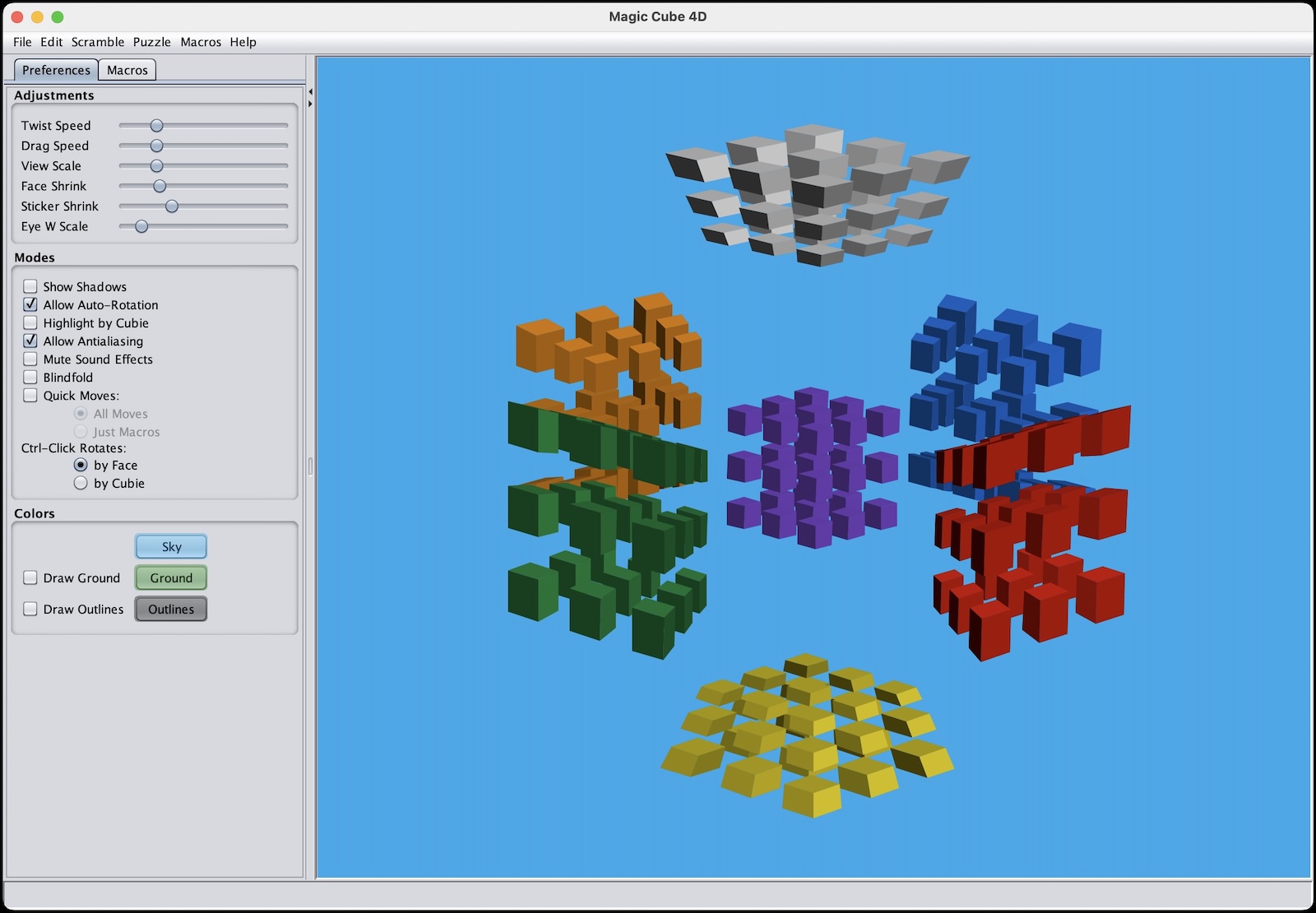
A puzzle with a long history
This is not my puzzle — I'm just a fan giving an old implementation a new home on the web. The 4D Rubik's cube, MagicCube4D, has been developed on and off by Don Hatch and Melinda Green starting in 1988. The original project lives on GitHub, and its git history stretches back about 17 years (it migrated from Google Code to GitHub at some point along the way).
Most of the active development seems to have wound down around 11 years ago, with a few changes 5 or 6 years ago. But the puzzle is far from forgotten: the repository has 62 issues, some as recent as September 2025, and there's still a reasonably active hypercubing mailing list. There's a real community of people who solve — and think hard about — higher-dimensional twisty puzzles.
What is a 4D Rubik's cube?
A standard Rubik's cube is a 3×3×3 arrangement whose six faces are 2D squares. Its four-dimensional cousin is built on the tesseract (hypercube): instead of six square faces, it has eight cubic cells, and a "twist" rotates one of those cells in four-dimensional space. What you see on screen is a projection of that 4D object down into something we can look at and manipulate.
How it was ported
The hardest part of the original MagicCube4D code base isn't the visuals or the 4D math you see — it's the geometry engine, a ~7,000-line n-dimensional CSG library that computes each puzzle's geometry rather than storing it. Every saved solution refers to that geometry by array index, so bit-for-bit compatibility with the original really matters.
Rather than reimplement that engine, the port takes a different route, laid out in two design docs written along the way:
- Architecture options — weighing four approaches: port the CSG engine to TypeScript, precompute geometry at build time, compile the Java to WebAssembly, or keep a Java backend.
- Implementation plan — the phased plan for the approach we chose.
Claude's commentary:
The winning approach was Option B: precompute the geometry at build time. A small Java exporter runs the original application and dumps each puzzle's geometry to compact binary assets, so the web app ships pre-generated data and never needs the CSG engine at all. That guarantees legacy compatibility "by construction," gives instant loads, and eliminates the riskiest code to port. The trade-off — no arbitrary runtime custom puzzles — is softened by exporting the full catalog of built-in puzzles.
From there the web app is a modern static site: React + TypeScript + Three.js, built with Vite. (Three.js is driven directly rather than through react-three-fiber, and the puzzle state lives in a small hand-rolled session hook rather than a state library — there turned out to be very little to hold.) The heavy lifting happens on the GPU — the vertex shader handles the 4D rotation, projection, front-cell culling, and shrinking — and picking is done with GPU color-ID rendering rather than raycasting, since the CPU never holds a copy of the 4D-warped geometry.
New UI features
Beyond a faithful port, I added some interface features that the original desktop app didn't have:
- Multi-angle mode — view the puzzle from several projection angles at once.
- Gallery view — browse the puzzle catalog with pictures rather than a text list.
- Classic catalog view — the familiar list-style picker for jumping to any puzzle.
- 3D cube mode — a traditional 3×3×3 Rubik's cube running on the very same engine.
Two of those turned into more than a feature, and are worth a section each.
Two interfaces
Once the puzzle was playable I kept adding controls to it, and after a while I realized I was spoiling the thing I most wanted to keep. The original MagicCube4D is one window with a trackball: you drag, the hypercube tumbles, you click a sticker to twist. Every button I added chipped away at that.
So rather than build one app with a settings panel, I built several on one engine. They share the geometry, the renderer and the twist logic — a second front-end costs its own layout and nothing more — and they differ only in what they put in front of you.
Classic interface is the original as it was: one viewport, the original colors on the original sky-blue background, and a trackball you drag. There is a Reset view button and that is about the whole of it. If you have used MagicCube4D before, nothing here should surprise you.
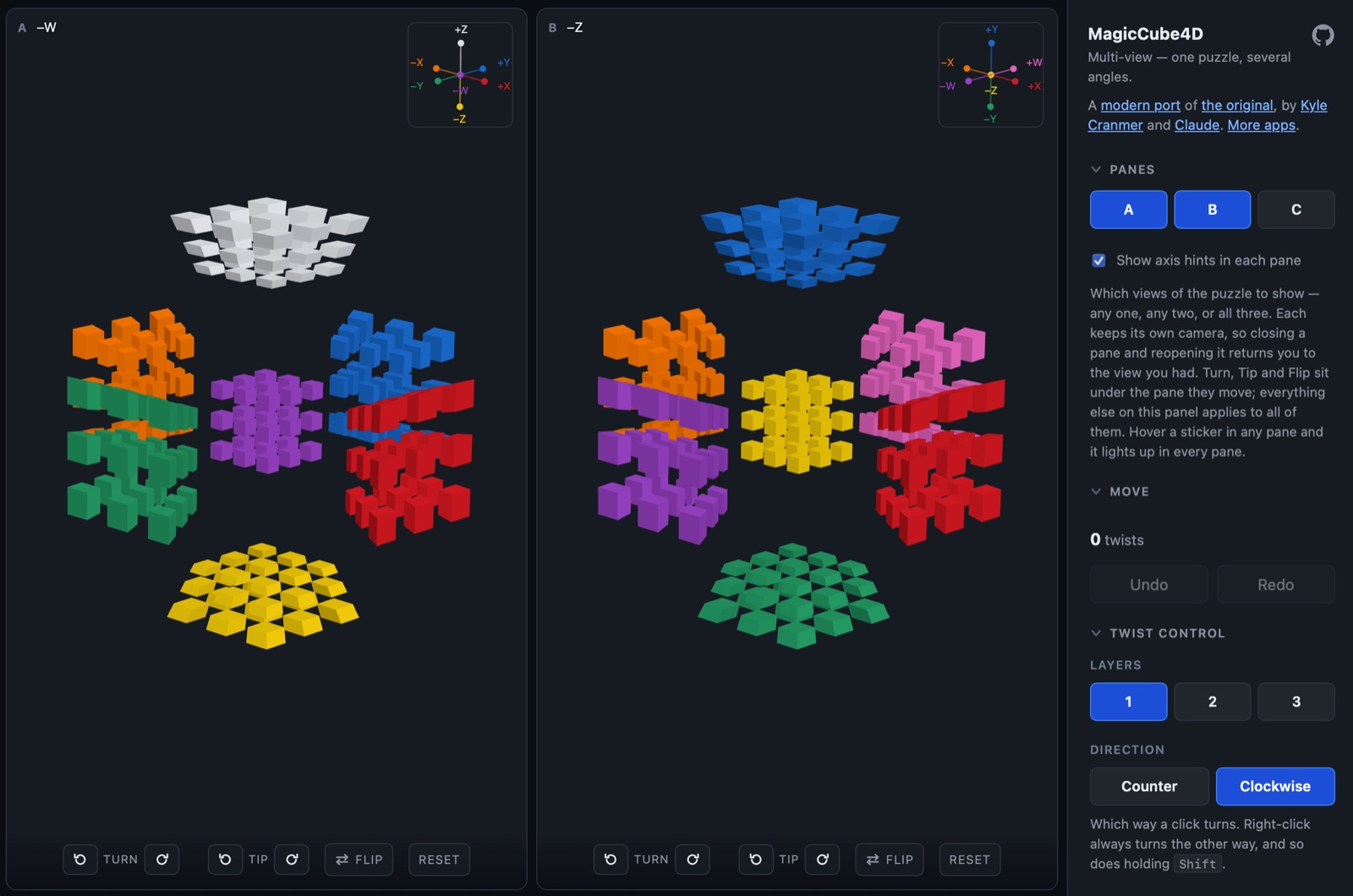
New interface is where the additions live. The obvious one is that you can have the same puzzle in up to three panes at once, from three different angles: twist in any pane and every pane turns, hover a sticker and it lights up in all of them. Seeing one twist from three viewpoints simultaneously does more for my intuition than any amount of dragging.
The less obvious addition is the one I care about more. A free trackball in four dimensions is very easy to get lost in. In 3D, if you tumble a cube into a bad orientation you can always find your way back, because you know what a cube looks like. In 4D you can end up looking at an arrangement that tells you nothing, with no obvious way to recover. So each pane gets three buttons that move between the eight natural ways of facing the puzzle instead:
- Turn — a quarter turn to the next oblique corner, keeping the same cell in the middle. The default view is deliberately oblique, so that seven of the eight cells are visible at once, and there are four equally good corners to view it from. This walks between them.
- Tip — swings a cell from the surrounding ring into the middle and drops the middle one into the ring. It is a three-cycle, so three presses bring you home.
- Flip — swaps the cell in the middle with the hidden one.
Turn and Tip between them reach four of the eight axis-aligned viewpoints; Flip is what makes all eight reachable, which is the entire reason it exists. There is also a small compass in the corner showing where the four axes currently point, with each spoke colored like the cell that sits on it. The axis pointing straight at you is not drawn at all — that is the cell the renderer hides so you can see into the interior.
None of this is in the classic app, on purpose. I tried the buttons there first, floating in the corners of the viewport, and then took them out. Two apps that each do one thing beat one app with a mode switch.
The gallery, and how far the framework generalizes
One interesting thing about the framework is that nothing in the engine is specifically about the
hypercube. A puzzle is a Schläfli product symbol and an edge length, and that is the whole
specification. The program constructs the polytope from the symbol, slices it with hyperplanes, and
derives the stickers, the twist axes and their rotation orders from whatever falls out. {4,3,3} 3
is the four-dimensional Rubik's cube. Change four characters and you get something nobody has a name
for.
Since the geometry is precomputed at build time, I could simply run the exporter over the whole catalog and see what the engine is capable of. It builds 136 puzzles across 23 families. Twenty-one of those are one slice to a side, which means they have no moves — genuine polytopes, but not puzzles — so the remaining 115 go into a puzzle gallery, rendered rather than listed, because a text list of Schläfli symbols tells you nothing about what you are about to open.
Browsing it is the best argument for the generality of Don Hatch's design that I can make:
{4,3,3}— the hypercube, from 2×2×2×2 up to 9 slices a side.{3,3,3}— the 5-cell, the four-dimensional simplex. Five tetrahedral cells; the smallest 4D puzzle there is.{5,3,3}— the 120-cell, built from 120 dodecahedra, which the catalog labels "Hypermegaminx (BIG!)" without exaggeration.{5,3}x{}— a dodecahedral prism, the four-dimensional extrusion of a megaminx.{3}x{4},{5}x{5},{10}x{10}… — duoprisms, the product of two polygons, which have no three-dimensional analogue at all. There is a 100-gonal one, because why not.
All of them are playable with exactly the same rules: click a sticker, the number of colors it carries picks the axis, and the puzzle turns. I did not write a line of code for any individual puzzle in that list, and neither did Don Hatch — that is the point of specifying a puzzle by its symbol instead of its geometry.
A 3D Rubik's cube, flat in the fourth dimension
Since the interface takes some getting used to, I thought it would be useful to make a normal 3D Rubik's cube using the same interface. That led to some surprises and revealed that I was a bit confused about how the interface worked in 4D and also revealed to me something pretty wild about the 4D hypercube (more later). I did have the idea that we could reuse the same engine if we just thought of the 3D cube as being flat in the 4th dimension.
Don Hatch's engine is genuinely n-dimensional. It does not hard-code the hypercube: you hand it a
Schläfli product symbol and an edge length, and it constructs the polytope, slices it with
hyperplanes, and derives the stickers and the twist axes from whatever comes out. {4,3,3} 3 is the
four-dimensional cube. {4,3} 3 is the one on your desk. The engine could always build both — nobody
had asked it to draw the second one in a browser.
Getting it on screen was mostly a matter of padding the geometry out to four dimensions with w = 0
and turning off one thing. (Well, getting Claude to do that.) The renderer hides the cell nearest you so that you can see through it
into the interior; for a puzzle that is flat in the fourth dimension there is no nearest cell, and if
you leave that test switched on it quietly culls everything.
What I actually cared about was the interface. In MagicCube4D, which axis a click means is inferred from how many colors the piece you clicked carries: a corner asks for a rotation about a vertex, an edge piece about an edge, a center about a face. That rule is the thing worth learning, and I wanted the 3D cube to teach it on a shape you can already picture rather than invent its own scheme.
It does, with one honest asymmetry that turned out to be the most interesting thing in the project. Click a centre sticker and you get the 90° face turn you expect. Click a corner and the axis is perfectly real — but it would turn the cubie by 120° and you can't rotate a corner piece in the 3D puzzle without breaking it. Similarly for the edge piece, but it would be a 180° rotation. The thing that is weird is that those are legal moves in 4-D. I'll have to create some images or something to explain that better later.
Along with the 3×3×3 you get 2×2×2 through 7×7×7, and a megaminx.
By the numbers
I was curious what this actually took, so I counted rather than guessed — the numbers below come from the Claude Code session logs and the git history.
- 81 prompts from me, over four days, totalling about 3,700 words. That is roughly seven pages of typing for the whole project, and most of the individual messages are a sentence or two.
- ~2,200 model turns in response, making 1,148 tool calls — 860 shell commands, 127 file reads, 137 file writes and edits.
- 86 commits, about 18,400 lines of TypeScript, CSS, docs and Java export tooling, and 409 tests.
The token counts are the part I found genuinely surprising. The model wrote about 2.8 million output tokens.
The ratio is the interesting bit: 3,700 words in, 18,400 lines of working software out. That gap is entirely filled by the model reading the original Java, checking its own work, and being told when it was wrong.
What about the environmental impact?
Having counted the tokens, I wanted to estimate what they cost in carbon. This is very hard to answer honestly, and the way it is usually answered is wrong.
If you ask a search engine, you get something like "0.45 to 20 grams of CO₂e per 1,000 output tokens", which for 2.8 million output tokens gives anywhere from 1.3 kg to 57 kg. More importantly, it prices only the output tokens, which is the wrong half of this workload: the conversation is re-sent on every step, so the input side is where most of the compute goes. Pricing an agentic coding session by its output tokens is like pricing a road trip by the return leg.
A better attempt is claude-carbon, which prices both sides separately, using factors regressed from Jegham et al. 2025 for Claude 3.7 Sonnet running on AWS: 39 gCO₂e per million input tokens, 826 per million output, and cached reads at 0.08× the input rate — they skip the prefill computation but still pay for the decode. Applied to what this project actually used:
| tokens | gCO₂e | share | |
|---|---|---|---|
| Cache reads | 1,066,103,626 | 3,326 | 50% |
| Output | 2,848,899 | 2,353 | 36% |
| Cache creation | 24,477,308 | 955 | 14% |
| Fresh input | 9,081 | 0.4 | — |
| Total | ≈ 6,634 g |
So roughly 6.6 kg of CO₂e, about the same as driving 17 miles. Note that the half of it I would have missed by counting output tokens alone is the cache reads — the cost of the model re-reading our conversation, over and over, all week.
I would treat even that as an order of magnitude rather than a measurement, for several reasons:
- Anthropic publishes no per-inference energy data. OpenAI has said an average ChatGPT query uses about 0.34 Wh, and Google puts the median Gemini text prompt at 0.24 Wh and 0.03 gCO₂e. For Claude there is no official figure at all, so every number above is third-party extrapolation.
- The factors are measured on the wrong model. They come from Claude 3.7 Sonnet; this project ran on Opus, which is substantially larger. 6.6 kg is closer to a floor than a midpoint.
- The cache multiplier is a derivation, not a measurement — the author gives it a range of 0.05–0.15×, and it drives half the total.
- It is inference only. No amortized training, no hardware manufacturing, no water. And none of the 860 shell commands, 86 CI runs and few dozen headless-browser rendering sessions, which ran on my laptop and on GitHub's machines rather than in a model.
None of which changes the order of magnitude: this was single-digit kilograms, not grams and not tonnes.
Reflections
All in all, this was a pretty fun project with a mix of 4D math, UI/UX, agentic coding, web technologies, and some digital anthropology. I hope you play around with it.